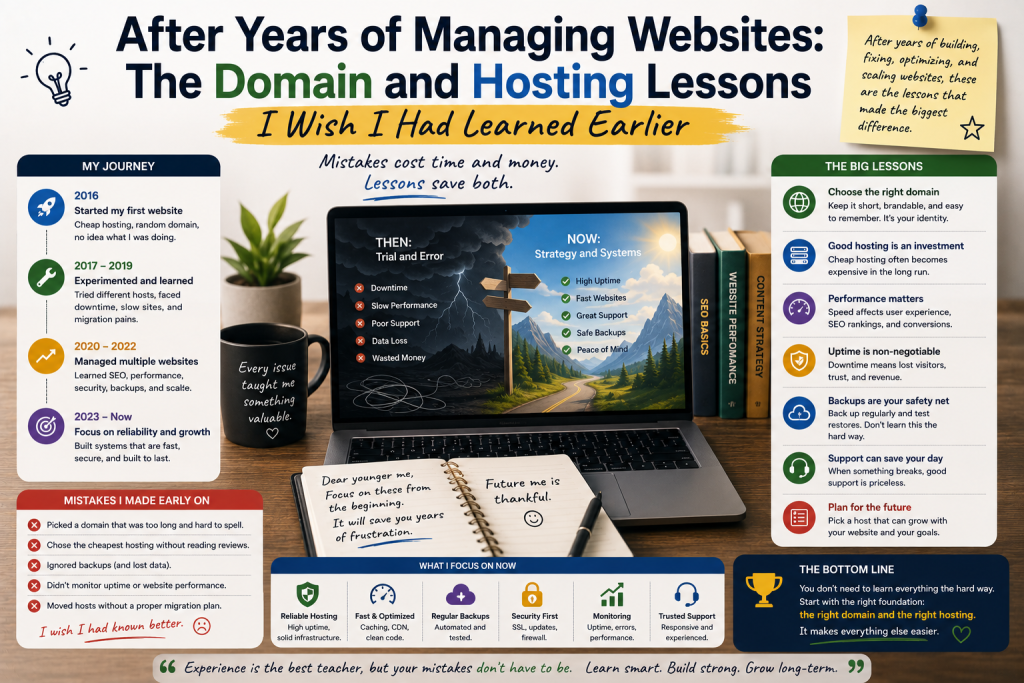

After years of managing websites, I have learned that the hardest part of running an online project is not always creating content or designing attractive pages. Some of the most important lessons come from the less visible parts of a website: the domain, hosting environment, security, backups, and ongoing maintenance.
When I started managing websites, I often focused on what visitors could see. I cared about design, content, and getting the website online as quickly as possible.
Over time, I realized that a website’s foundation matters just as much as its appearance.
Here are the domain and hosting lessons I wish I had learned earlier.
1. A Domain Is a Long-Term Asset
When I first registered a domain, I treated it like a simple web address.
Today, I see it differently.
A domain can become part of a website’s identity and brand. Changing it later can be complicated because visitors may already know the original address, and other services may depend on it.
That is why I now spend more time evaluating a domain before registering it.
I consider whether it is easy to remember, simple to spell, relevant to the project, and flexible enough to support future changes.
A few extra minutes of research at the beginning can prevent significant problems later.
2. Cheap Is Not Always the Same as Good Value
In my early days, I often compared hosting plans primarily by price.
That seemed logical.
Why spend more when a cheaper package could keep a website online?
Eventually, I learned that hosting value involves much more than monthly cost.
Performance, resource limits, backups, security features, support, reliability, and upgrade options can all influence the actual experience.
A cheap plan can be perfectly suitable for a small website.
But if the website outgrows it, saving a few dollars may not be worth the resulting limitations.
3. Always Understand Your Hosting Limits
One lesson I learned the hard way was to understand exactly what a hosting plan allows.
Storage is only one resource.
Depending on the hosting environment, websites can also be affected by CPU usage, memory, database limits, processes, bandwidth policies, and other restrictions.
A website can work perfectly for months and then begin experiencing problems as traffic or functionality increases.
Monitoring resource usage helps identify these issues before they become serious.
4. Backups Should Never Be an Afterthought
If I could give my younger self only one piece of website advice, it would be this:
Back up everything important.
Website files and databases represent significant amounts of work.
Mistakes happen. Software can fail. Updates can create compatibility issues. Files can be deleted accidentally.
A reliable backup provides a safety net.
I also learned that having a backup is not enough. You should understand where it is stored and how to restore it.
A recovery process should be practical, not theoretical.
5. Do Not Make Unnecessary Changes
Another lesson came from troubleshooting.
When something went wrong, I sometimes changed several settings at once.
That made diagnosing the problem much harder.
Now I prefer making one change, testing the result, and documenting what happened.
This approach may take slightly longer initially, but it prevents confusion.
It also makes it easier to reverse a change when necessary.
6. Security Starts With the Hosting Account
Website security is often discussed in terms of plugins, themes, and software updates.
But the hosting account itself is equally important.
A compromised hosting account can potentially expose website files, databases, email configurations, and other resources.
I learned to use strong credentials, enable available account security measures, limit access, keep software updated, and remove unnecessary components.
Security is not a one-time task.
It is part of ongoing website management.
7. DNS Deserves More Attention
DNS seemed complicated when I first encountered it.
Eventually, I realized that understanding basic DNS concepts can save considerable troubleshooting time.
Knowing what nameservers and common DNS records do makes domain and hosting changes much easier to understand.
You do not need to become a DNS expert.
But knowing where your domain points and how important records are configured can be extremely useful.
8. Plan for Hosting Migration Before You Need One
I once thought that changing hosting providers would only be necessary if the current provider became unusable.
That was too narrow a perspective.
There are many reasons a website owner might eventually migrate: performance requirements, pricing, support, resource limitations, infrastructure changes, or business growth.
Knowing how your website is structured makes migration easier.
Keep track of important credentials, databases, configuration details, backups, and domain settings.
That information can save significant time when moving to another environment.
9. Support Matters When Things Go Wrong
Hosting support is easy to ignore when everything works.
When a server problem occurs, however, good support can become extremely valuable.
I learned to evaluate providers based not only on advertised specifications but also on documentation, communication, and the availability of assistance when problems occur.
A hosting plan is part of an operational relationship, not just a storage package.
10. Do Not Overcomplicate the Website
Over the years, I have also learned to appreciate simplicity.
It is tempting to install another plugin, add another script, or activate another feature because it sounds useful.
But every additional component can introduce maintenance requirements.
I now ask whether a feature solves a genuine problem before adding it.
A simpler website is often easier to secure, maintain, troubleshoot, and improve.
11. Performance Is a Continuous Process
Website performance is not something you optimize once and forget.
Images become larger, content increases, plugins change, traffic grows, and software evolves.
I learned to periodically review page performance and remove unnecessary resources.
Hosting plays an important role, but good performance usually requires attention to the entire website.