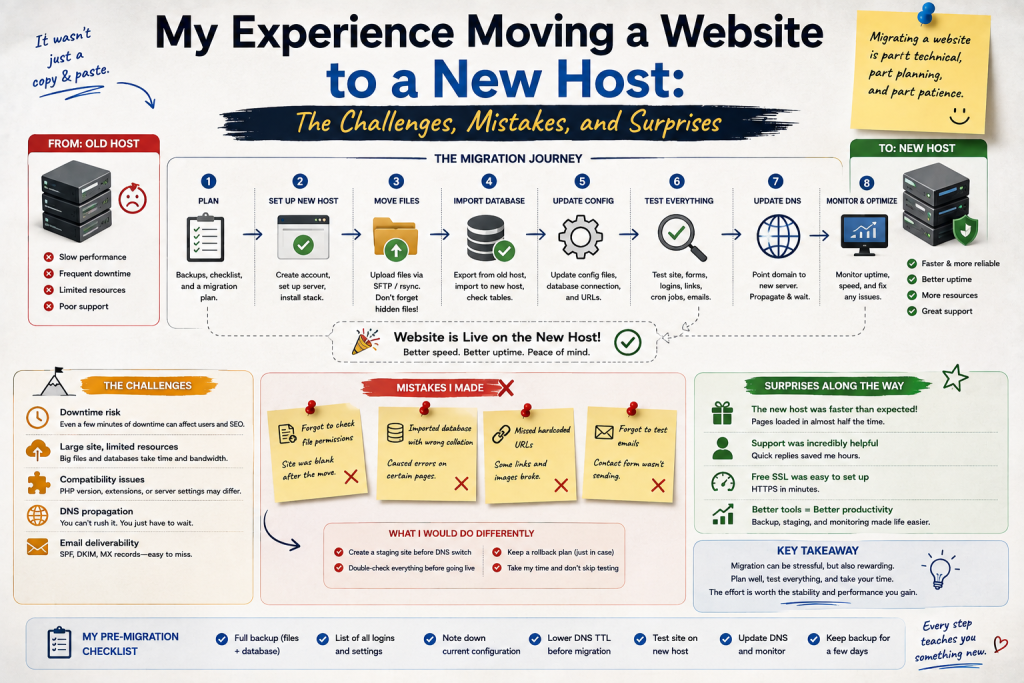

Moving a website to a new hosting provider sounded like a straightforward task when I first planned it. I imagined downloading my website files, moving them to another server, transferring the database, changing a few DNS settings, and waiting for everything to work.
The reality was more complicated.
The migration itself taught me that a website is made up of many interconnected parts. A successful move requires more than copying files. It involves preparation, testing, DNS configuration, security, backups, and patience.
Here is what happened during my website migration and the lessons I took away from it.
Why I Decided to Move
My decision to change hosting did not happen overnight.
The website had grown over time, and I started noticing that my existing hosting environment was no longer ideal for my needs. I wanted better performance, more flexibility, and an environment that could support future growth.
I also wanted to compare the level of service and management tools available elsewhere.
Instead of immediately canceling my old hosting account, I decided to prepare the new environment first.
That turned out to be an important decision.
The First Challenge Was Preparation
Before touching the website, I made a list of everything that needed to be moved.
This included website files, databases, email-related settings where applicable, DNS records, SSL configuration, and various application settings.
I also created backups.
This may sound obvious, but it is easy to become impatient when you want the migration finished.
I reminded myself that a backup is not wasted time.
It is insurance against an unexpected mistake.
My First Mistake Was Underestimating the Database
I initially thought the website files were the most important part of the migration.
Then I realized that the database was equally important.
For websites that rely on databases, the files and database work together.
Moving the files without properly transferring the database can leave a website incomplete or unusable.
I therefore made sure the database was exported, transferred, and configured correctly on the new server.
This was one of the first moments when I realized that understanding how my website worked internally was extremely valuable.
The New Server Was Not Identical
Another challenge was that the new hosting environment was configured differently from the old one.
Some software versions and server settings were not exactly the same.
The website initially displayed an error in one area.
At first, I worried that the entire migration had failed.
After checking the configuration, I found that the problem was related to compatibility between the website software and the new environment.
Once the relevant settings were adjusted, the problem disappeared.
The lesson was important: moving a website is also moving it into a new technical environment.
Testing Before Changing DNS Saved Me
One of the smartest things I did was test the website on the new server before switching the domain completely.
I checked important pages, images, forms, login functions, databases, and other essential features.
This allowed me to find problems while the old website was still available to visitors.
If I had changed DNS immediately, I would have been troubleshooting while customers or readers were trying to access the website.
Testing beforehand made the final transition much less stressful.
DNS Created Some Confusion
Once I was satisfied with the new hosting environment, I updated the necessary DNS settings.
This was another learning experience.
DNS changes do not always become visible everywhere at exactly the same time.
For a while, different connections appeared to reach different versions of the website.
That was confusing, but it was also a reminder that internet infrastructure does not always change instantaneously.
Instead of repeatedly changing settings, I verified the configuration and waited.
The Biggest Surprise Was How Many Small Details Matter
The migration showed me that small details can have significant consequences.
A missing database setting, an incorrect path, a forgotten configuration value, or an improperly transferred file can create unexpected problems.
None of these issues necessarily means the entire migration has failed.
The key is to troubleshoot systematically.
I started documenting every change so I could understand what had been modified.
I Nearly Forgot About Email
One surprise was realizing that domain and hosting changes can affect more than the website itself.
If email services are connected to the domain, DNS records related to email need to be considered during a migration.
This was an important reminder that a domain can support multiple services.
A website migration should therefore include an inventory of the domain’s important DNS records before making changes.
Performance Was Better, but Not Automatically Perfect
After the migration was complete, I noticed that the website felt more responsive.
However, I also realized that moving to better hosting does not automatically solve every performance problem.
Large images, unnecessary scripts, inefficient plugins, and other website-level issues can still slow pages down.
The new hosting environment provided a better foundation, but I still needed to optimize the website itself.
What I Would Do Differently
If I had to migrate another website, I would prepare an even more detailed checklist.
I would document the existing server environment, DNS records, database settings, software versions, scheduled tasks, email configuration, and other important components.
I would also create multiple backups and test the restoration process before starting the migration.
Most importantly, I would schedule the migration when I had plenty of time to troubleshoot.