
Switching web hosts is one of those tasks that looks simple when explained in theory. Move the website files, transfer the database, update the domain settings, and wait for everything to work.
That was what I expected when I decided to move one of my websites to a new hosting provider.
In reality, the migration became a useful lesson in preparation, patience, backups, performance, and the importance of understanding how a website works behind the scenes. Some things improved immediately, while others went wrong in ways I had not anticipated.
Here is what I learned from the experience.
Why I Decided to Switch Hosts
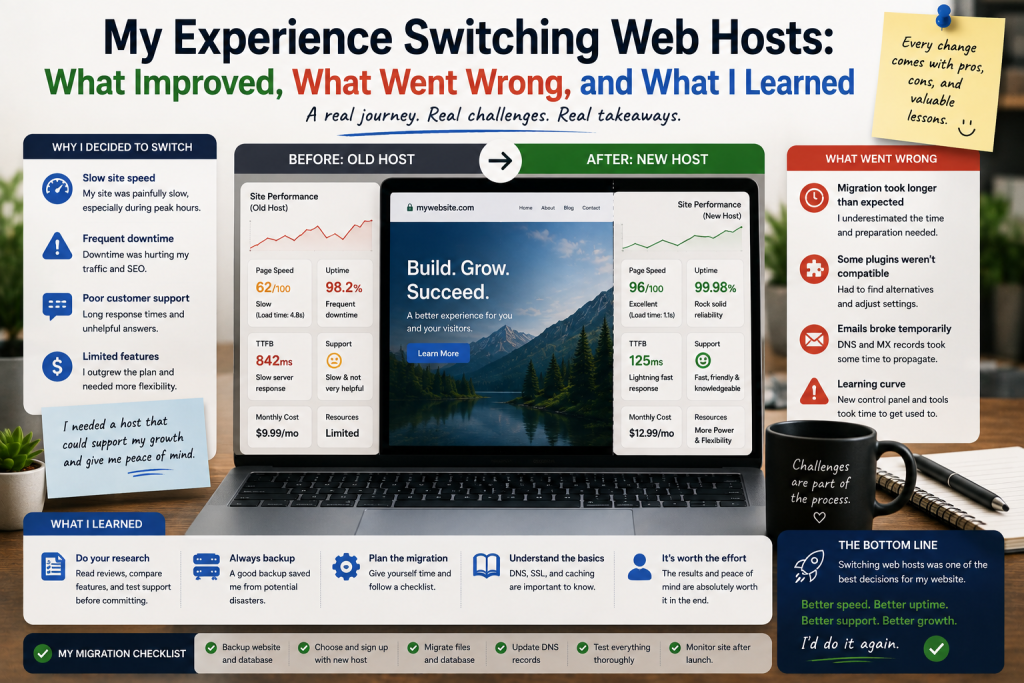
My decision to change hosting was not based on one single problem.
Over time, I became increasingly aware of several limitations. The website occasionally felt slower than I expected, some resources were becoming restrictive, and I wanted a hosting environment that offered more flexibility.
I also wanted better options for managing backups, databases, security, and future growth.
Instead of simply choosing another provider because it advertised better specifications, I made a list of the things that were actually important to my website.
That turned out to be one of the best decisions I made during the entire process.
Choosing the New Host
I compared several hosting options based on more than price.
I looked at available resources, storage, database support, backup options, security features, control-panel functionality, upgrade possibilities, and technical support.
I also considered whether the new environment would be compatible with the software already running on my website.
This was important because a hosting plan can look attractive on paper while still being inconvenient for a particular website.
The lesson was simple: hosting should be chosen according to the website’s requirements, not just the number of features advertised.
I Created a Backup Before Doing Anything
Before beginning the migration, I created backups of the important website files and databases.
This was probably the most important step of the entire process.
A website migration involves many moving parts. If something goes wrong, having a reliable backup provides a way to recover.
I also made sure I knew where the backup files were stored and how they could be restored.
That gave me much more confidence when making changes.
The Actual Migration Was More Complicated
Moving the website involved transferring files and databases to the new hosting environment.
The process itself was manageable, but I encountered several small issues.
Some configuration settings were different from the old server.
Paths, database credentials, PHP settings, and other environment details needed to be checked.
This was when I realized that a website is not simply a collection of files.
Some components depend on the server environment in which they operate.
The First Problem: Something Did Not Work
After transferring the website, one part of it did not function correctly.
At first, I assumed the migration had failed completely.
After checking the configuration, I discovered that the problem was related to settings that were different on the new server.
Once those settings were corrected, the website started working normally again.
This experience taught me not to panic when something goes wrong during migration.
A problem does not necessarily mean the entire migration has failed.
The key is to identify the specific component causing the issue.
DNS Was Another Important Step
Once the website was working on the new server, I needed to point the domain toward the new hosting environment.
This involved changing DNS settings.
I had already learned that DNS changes can take time to become visible across different networks, so I did not immediately assume something was broken when the website did not appear consistently.
During this period, I carefully checked the website from different connections and monitored whether the new server was responding correctly.
Patience was surprisingly important.
What Improved After the Switch?
Once everything stabilized, I began noticing several improvements.
The website felt more responsive in everyday use.
Administrative tasks were also easier in some areas because the new hosting environment provided tools that better matched my workflow.
I also appreciated having clearer options for managing resources and planning future upgrades.
The improvement was not simply about raw server specifications.
The overall hosting environment felt better suited to what I was trying to accomplish.
What Went Wrong?
Not everything was perfect.
The migration took longer than I originally expected.
I also encountered configuration problems that required troubleshooting.
For a short period, there was uncertainty about whether everything had transferred correctly.
This reinforced an important lesson: never schedule a website migration at the last possible moment.
Having extra time makes it much easier to test the website before relying on the new environment.
Testing Became My New Habit
After the migration, I tested the website more thoroughly than I had before.
I checked important pages, forms, images, databases, login functionality, links, and other critical features.
I also checked whether the website worked properly on different devices.
This process revealed a few small problems that I could fix before they affected visitors.
Testing was not the most exciting part of the migration, but it was one of the most valuable.
What I Would Do Differently
If I had to switch hosts again, I would create a detailed migration checklist before starting.
I would document the existing configuration, make multiple backups, test the new hosting environment before changing DNS, and allow plenty of time for troubleshooting.
I would also avoid making unrelated changes to the website during the migration.
Keeping the process focused makes it much easier to identify the cause of any problem.