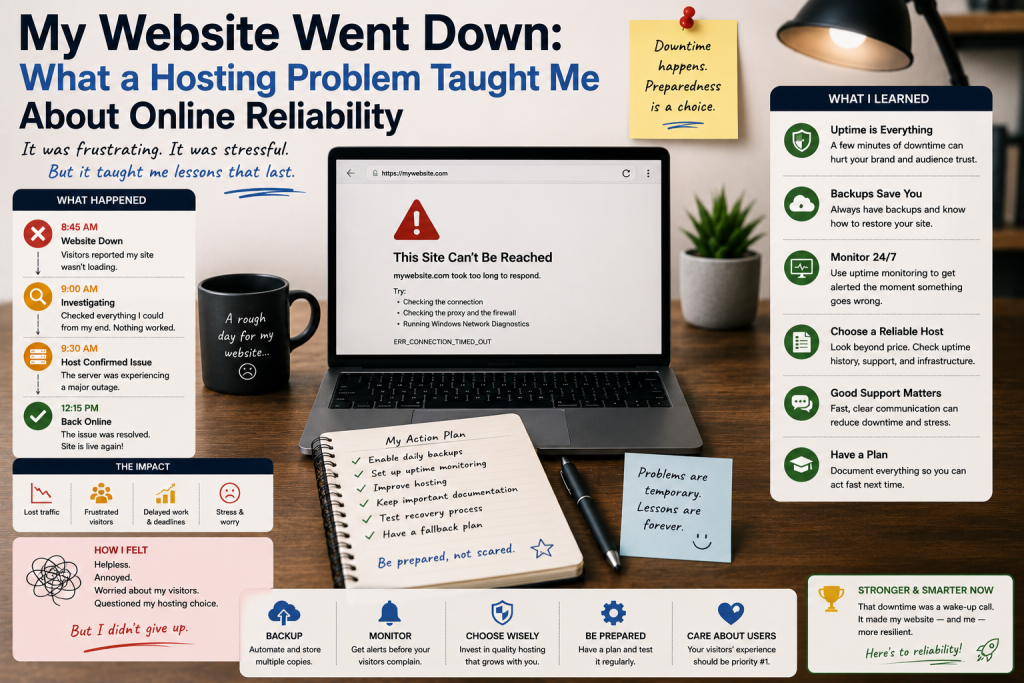

The first time my website went down, I initially thought the problem was with my own computer.
I refreshed the page several times, checked my internet connection, and tried opening the website from another device. Nothing changed. The website was simply unavailable.
It was an uncomfortable experience, especially because I had spent so much time creating the site and assumed that once it was online, it would remain accessible.
That unexpected outage taught me an important lesson: having a website is one thing; keeping it reliably available is another.
The First Few Minutes Were Confusing
When a website suddenly becomes inaccessible, it can be difficult to know where the problem is.
Is the hosting server down?
Is there a DNS issue?
Did a recent software update cause a problem?
Could the domain have expired?
Or is the problem limited to my own internet connection?
My first reaction was frustration.
I wanted to fix the problem immediately, but I quickly realized that randomly changing settings could make things worse.
Instead, I started troubleshooting one possibility at a time.
I Checked My Internet Connection First
The simplest explanation should always be checked first.
I opened other websites and confirmed that my internet connection was working normally.
Then I tried accessing my website from another connection.
The result was the same.
That gave me an important clue: the problem was probably not limited to my device or local network.
This simple diagnostic step helped me avoid changing website settings unnecessarily.
The Hosting Environment Became the Main Suspect
After confirming that the problem was not my connection, I checked the hosting environment.
Hosting providers typically offer tools or status information that can help identify service interruptions.
I also checked whether I could access the hosting control panel.
This distinction was useful.
If the website was unavailable but the hosting account remained accessible, the problem could be related to the website configuration rather than the entire server.
If multiple services were inaccessible, the issue might be broader.
The Importance of Backups Became Obvious
Before this incident, I knew backups were important.
After the outage, I understood why.
A website represents hours of work.
Content, images, databases, configurations, and customizations can be difficult to recreate from scratch.
Having recent backups gave me confidence that even if the problem became more serious, I had a recovery option.
That experience changed my attitude toward backups.
I stopped thinking of them as something I might need someday and started treating them as part of regular website maintenance.
An Outage Can Affect More Than Visitors
Initially, I thought the main problem was that visitors could not access the website.
Then I considered the broader consequences.
An unavailable website can interrupt customer inquiries, online sales, advertising campaigns, content publishing, and other activities.
For a business that relies heavily on its website, even a relatively short outage can become a serious operational issue.
This made me realize that website availability is part of the overall customer experience.
Hosting Quality Matters
The incident also changed how I evaluated web hosting.
Previously, I focused heavily on storage, bandwidth, and pricing.
After experiencing downtime, I started paying more attention to reliability, technical support, backup options, server monitoring, security, and the provider’s ability to handle problems.
A hosting plan is not simply a place to store website files.
It is part of the infrastructure that keeps the website accessible.
I Learned Not to Make Random Changes
One of the most useful lessons was about troubleshooting.
When something goes wrong, it can be tempting to change multiple settings at once.
That approach makes it difficult to understand what actually fixed the problem.
I learned to make one change at a time, document what I changed, and test the result.
This method may feel slower, but it reduces confusion.
It also makes it easier to reverse a change if necessary.
Monitoring Became More Important
After the incident, I became more interested in website monitoring.
A monitoring service can check whether a website is responding and alert the owner when an outage is detected.
This can be useful because website owners cannot realistically sit in front of a browser all day refreshing their homepage.
The sooner an outage is discovered, the sooner investigation can begin.
Having a Backup Plan Matters
The experience also encouraged me to think about contingency planning.
What happens if the primary hosting server becomes unavailable?
What happens if a website file is accidentally deleted?
What happens if a software update creates compatibility problems?
Having backups is one part of the answer.
Knowing how to restore the website is another.
A backup that cannot be restored when needed is much less useful than a tested recovery process.
Security and Updates Are Connected to Reliability
I also learned that reliability is not completely separate from security.
Outdated software, vulnerable plugins, weak passwords, and poorly maintained systems can create problems that affect website availability.
Regular updates and security checks can therefore contribute to reliability as well.
However, updates should be approached carefully.
For important websites, testing changes before applying them to a production environment can reduce the risk of unexpected compatibility problems.
What I Would Do Differently Today
If I were setting up the website again, I would prepare for outages before one happened.
I would maintain regular backups, understand how to restore them, monitor website availability, keep important software maintained, secure hosting accounts, and know how to contact technical support.
I would also keep a basic record of important configuration details.
That information can save valuable time when troubleshooting.