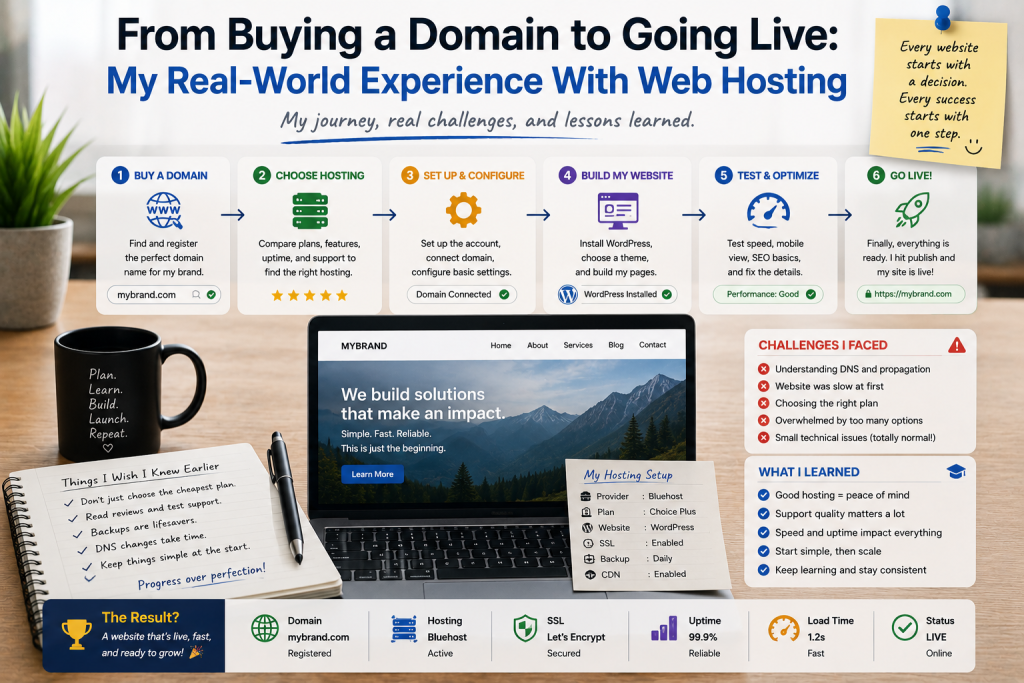

Launching a website sounds simple when you describe it in one sentence: buy a domain, choose hosting, upload the website, and go live.
That was more or less what I thought when I started my first website.
The reality was more interesting. I quickly discovered that creating an online presence involves several small decisions, technical steps, and unexpected lessons. None of them were impossible, but they were easier to handle once I understood what was actually happening behind the scenes.
Here is what I learned from going through the process from purchasing a domain to making a website publicly accessible.
Choosing the Domain Came First
The first step was finding a suitable domain name.
I initially believed this would take only a few minutes. Instead, I spent considerably longer checking different possibilities because many of the names I wanted were already registered.
I eventually stopped looking for a “perfect” name and focused on a practical one.
My criteria became simple: it should be relatively easy to remember, straightforward to spell, and connected to the website’s purpose.
I also tried to think beyond the immediate project.
A domain that is too specific can become a problem if the website eventually expands into new subjects or services.
That was my first lesson: a domain is a long-term identity, not just a temporary web address.
Understanding Hosting Was the Next Challenge
After registering the domain, I needed hosting.
This was where I encountered terminology that was unfamiliar to me.
Shared hosting, storage, bandwidth, databases, SSL certificates, backups, control panels, and server resources were all terms I had seen but did not fully understand.
I initially focused on price.
However, comparing hosting plans taught me that the cheapest option is not necessarily the most suitable one.
I began looking at the features included in each plan rather than simply comparing monthly costs.
For a small website, a basic hosting plan may be sufficient. A growing website may eventually need more resources.
Connecting the Domain and Hosting
The next step was connecting my domain to the hosting account.
This involved DNS and nameserver settings.
At first, the process seemed complicated because changing a few settings could determine whether visitors reached the correct server.
Once I understood the basic concept, it became much easier.
The domain acts like the address, while hosting provides the server environment where the website lives.
The two need to point to each other correctly for visitors to reach the site.
I also learned that DNS changes may not appear everywhere immediately, so patience is sometimes necessary.
Uploading the Website Felt Like a Milestone
Once the domain and hosting were connected, I could finally upload the website.
Depending on the hosting environment, this could involve a control panel, file manager, FTP, or another deployment method.
Seeing the website appear under my own domain was one of the most satisfying moments of the process.
It felt different from simply viewing a project on my computer.
The website was now accessible to people outside my local environment.
But going live was only the beginning.
SSL Was Not Something I Wanted to Ignore
Security became one of my priorities after the initial setup.
I wanted visitors to access the website through HTTPS rather than an unsecured connection.
An SSL/TLS certificate helps enable encrypted HTTPS connections between visitors and the website.
Modern hosting providers often make this easier than it used to be, but I still learned that it is something website owners should verify rather than assume.
A website that looks finished can still have important technical details waiting to be configured.
Backups Changed My Attitude Toward Website Management
One lesson I learned relatively early was the importance of backups.
Before launching the site, I thought backups were mainly something experienced website administrators worried about.
That changed quickly.
A website contains content, databases, configuration files, images, and other information that may be difficult to recreate.
A backup provides a way to recover if something goes wrong.
I became much more comfortable making changes once I knew I had a recent copy of important information.
Performance Became Important After Launch
When the website first went live, I was primarily interested in whether everything worked.
After that, I started thinking about performance.
Pages need to load efficiently, images should be optimized, and unnecessary scripts should not consume resources.
I also realized that hosting performance can influence the overall experience.
A beautiful website is less impressive if visitors have to wait too long for pages to load.
This encouraged me to think about hosting as part of the website experience rather than simply a place to store files.
Technical Support Was More Valuable Than Expected
Another lesson was the importance of support.
When something does not work as expected, having clear documentation or helpful technical support can make a huge difference.
As a beginner, I sometimes spent too much time trying to solve relatively small issues alone.
Eventually, I learned that asking for help or consulting reliable documentation is not a sign of weakness.
It is simply an efficient way to manage technical problems.
Planning for Growth
My first hosting decision was based mostly on what I needed at that moment.
If I were doing it again, I would think more about future growth.
I would check whether the hosting provider makes it easy to upgrade resources, manage backups, secure accounts, and move a website if necessary.
That does not mean buying the largest hosting package from day one.
It means avoiding an environment that creates unnecessary limitations later.